































































Building a productive desk setup: gear and layout tips
From monitor height to cable management and keyboard choice to lighting, take inspiration from our team's desks to build a workspace that's both productive and good-looking.


Table of contents
The desk where we spend eight hours a day directly affects our productivity and our health. A monitor at the right height reduces neck pain, a good keyboard eases wrist fatigue, and tidy cables calm a cluttered mind. In this gallery we use examples from our team's own desks to show how to build an ergonomic, organized workspace.
Ergonomics: screen, keyboard and seating
The foundation of an ergonomic desk is monitor position. The top edge of the screen should be at or slightly below eye level, with about an arm's length between you and the screen. Using a laptop directly on the desk makes you constantly bend your neck down; an external monitor or laptop stand solves this problem. The Aurion Vista 4K's stand, with height, tilt and swivel adjustment, lets you position the screen exactly to suit your body. If you use two monitors, place the main screen directly in front of you and the second at a slight angle beside it. That way you won't have to keep turning your neck in one direction.
Position your keyboard and mouse so that your elbows are bent at about ninety degrees and your shoulders are relaxed. Compact keyboards without a number pad, like the Dragon Gear Claw, reduce shoulder strain because they let you keep the mouse closer to your body. Use a low-profile keyboard or a wrist rest so your wrists don't bend upward. In your chair, your feet should rest flat on the floor and your back should be supported by lumbar support. Taking a short break and standing up every thirty to forty-five minutes does more good than the best equipment. A height-adjustable desk makes it easy to switch between sitting and standing.
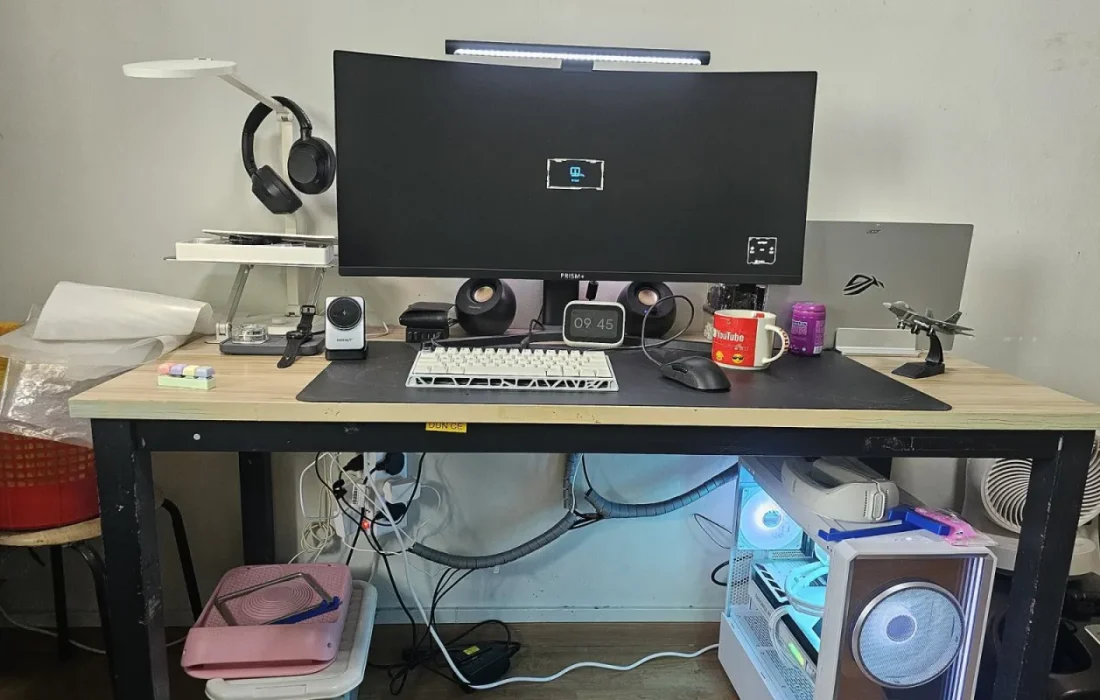
A tidy desk is the first step toward a focused mind.
Ethan Brooks
A tidy desk with a single cable
Messy cables look bad and make the desk harder to clean. The secret to a tidy desk is cutting down the number of cables from the start. When you use a monitor that carries video, data and charging over USB-C, you connect your laptop with a single cable; your keyboard, mouse and external drives plug into the monitor's USB hub. A quality cable that supports high power and video, like the Voltra Braided USB-C, is the key to this setup. With this approach, the number of visible cables on your desk can drop to two, or even one. And when you close your laptop and put it away, the desk clears in a second, letting your mind rest when the workday is over.


For the remaining cables, use a cable tray or mesh basket mounted under the desk. Gathering your plugs on a power strip fixed to the underside of the desk eliminates clutter on the floor. Choosing a wireless keyboard and mouse can remove cables from the desk surface entirely. Set up a single charging spot for your phone and earbuds; a multi-port GaN charger replaces several chargers and simplifies the desk. Marking cables with small labels by color or device saves time when you want to change something later. That way you won't have to hunt for which cable goes where.
Lighting and personal touches
Lighting is the most neglected element of ergonomics. Bright window light behind the monitor increases eye strain; if possible, position the desk perpendicular to the window. Working by screen light alone in the evening strains your eyes. A soft backlight placed behind the desk, or a smart bulb with adjustable color temperature like the Yuvio Glow, balances the contrast and shifts to warm tones at the end of the day to support your sleep pattern. Keeping screen brightness close to the ambient light is another simple but effective habit that reduces eye strain. If your monitor has a low blue light mode, turn it on in the evening.
| Topic | Guide |
|---|---|
| Highlights | desk setup, ergonomics, monitor |
| Reading time | 6 minutes |
| Written by | Ethan Brooks |
Key takeaways
- The top edge of the monitor should be at eye level, an arm's length away.
- Connect your laptop with a single cable using a USB-C monitor.
- Gather cables in an under-desk tray and power strip.
Finally, let the desk reflect your personality, but keep it simple. A small potted plant, a favorite book or a compact speaker like the Rezona Wave Mini makes the workspace feel warmer. Arrange the left and right sides of the desk by how often you use things: what you touch every day within arm's reach, what you rarely use in a drawer. The example desks in the gallery offer practical ideas for different budgets and room sizes. If you're planning a new desk setup, our team is happy to help you choose the right products.



Leave a comment